
What Are WordPress Hooks And Why Should You Care About WordPress Hooks
If you want WordPress to send an email every time a new post is published on WordPress or you want to add a custom message to every product description in WooCommerce or you need to resize images differently than WordPress does by default on WordPress then you have to figure out how to do it.
You do not want to change the core WordPress files because that is an idea that will cause problems with every WordPress update.
The solution to this problem is WordPress Hooks, the functions add_action and add_filter.
These two WordPress functions are the parts of WordPress plugin and theme development. They are how your code can work with the processes of WordPress in a clean and safe way that will not break when WordPress is updated. Once you understand how WordPress hooks work you will be able to do a lot of things with WordPress.
In this guide you will learn what add_action and add_filter are, how they are different, from each other when to use each WordPress function. You will see real code examples that you can use with WordPress today.
Understanding the WordPress Hook System
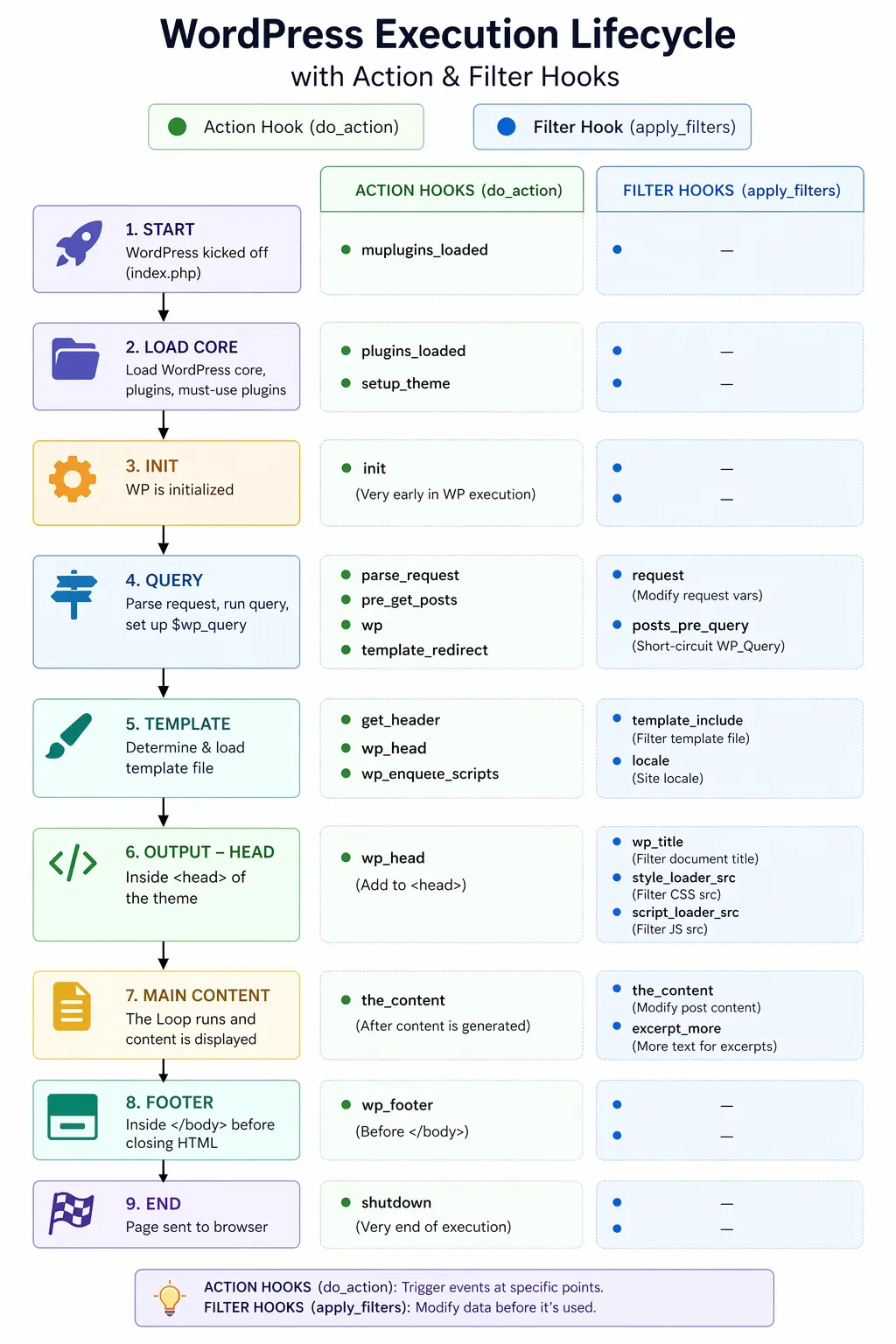
So you want to know about the WordPress hook system. Well lets start with the basics. WordPress is like a factory that makes web pages. When you ask for a page it does a lot of things. It gets information from the database finds the posts you want and makes the HTML code.
As it does all these things it stops at different points and says “Hey is anyone there? Do you want to add something ” These points are called hooks. You can write your code and attach it to these hooks so it runs at the right time.
Think of it like an assembly line. WordPress goes through steps to make a web page. At each step it checks if you want to do something. If you do your code runs.
There are two types of hooks in WordPress:
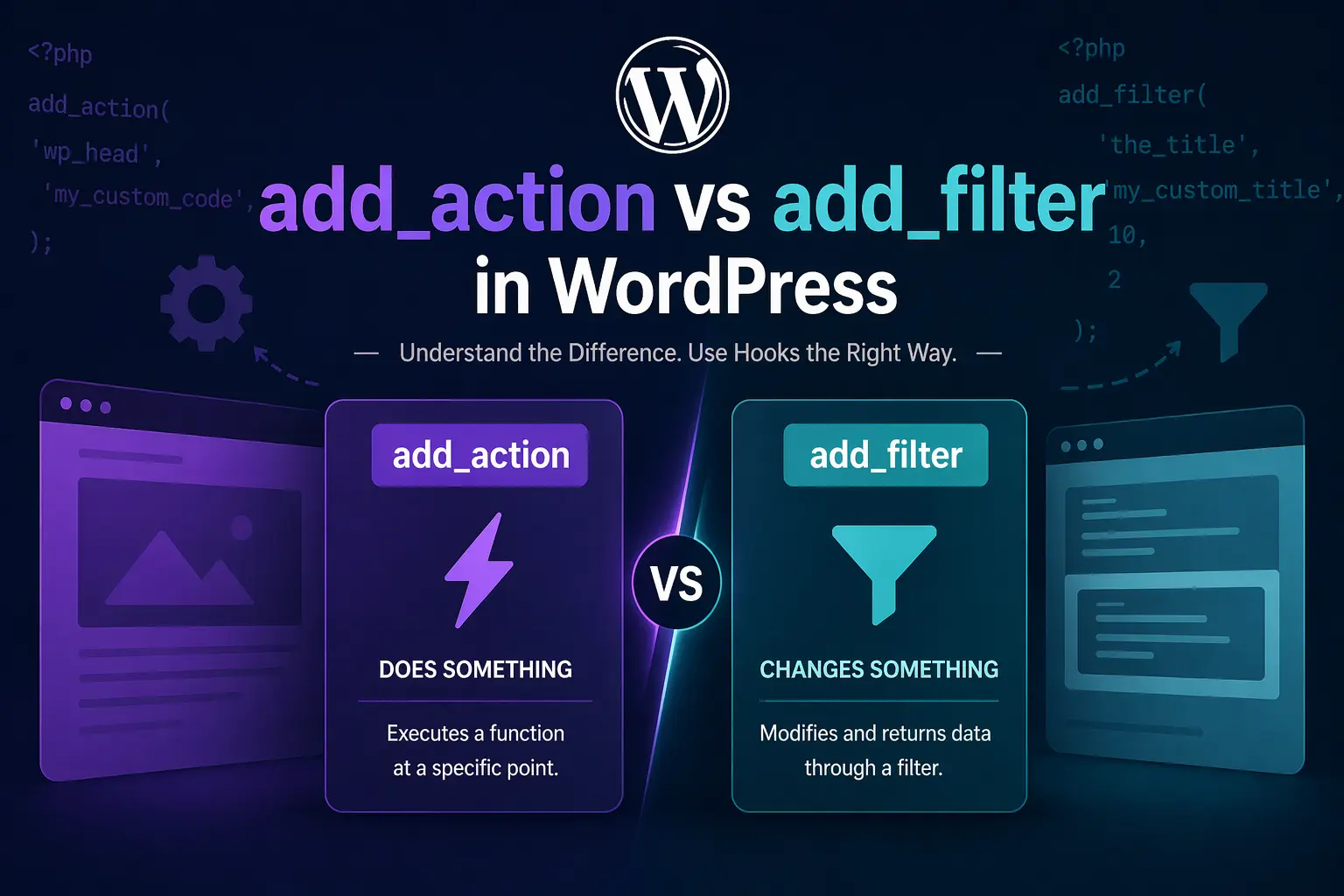
- Action Hooks — Let you do something at a specific point (like sending an email or adding HTML)
- Filter Hooks — Let you modify data before it’s used (like changing the content of a post)
What Is add_action() in WordPress?
The add_action() function helps you connect your function to a specific action, in WordPress.
When WordPress gets to that action it will run your function.
Action hooks are used for taking actions. They do not give back any results.
You are telling WordPress. When you get to this point also please run my function with add_action().
You use add_action() to do things.
The Syntax of add_action()
add_action( $hook_name, $callback, $priority, $accepted_args );
Here’s what each parameter means:
- $hook_name — The name of the action hook you want to attach to (e.g., ‘init’, ‘wp_head’, ‘save_post’)
- $callback — The name of your function that should run when the hook fires
- $priority — (Optional) A number that controls the order. Lower numbers run first. Default is 10
- $accepted_args — (Optional) How many arguments your function accepts. Default is 1
A Simple add_action() Example
Let’s say you want to add a welcome message right after the closing </head> tag:
// Step 1: Register your function with the hook
add_action( 'wp_head', 'my_custom_head_code' );

// Step 2: Write the function that will run
function my_custom_head_code() {
    echo '<!-- Custom code added by my theme -->';
}
That’s it. When WordPress processes wp_head, it will automatically call my_custom_head_code() and whatever you echo inside it will appear in the HTML output.
Real-World add_action() Examples
Here are some practical examples you might actually use:
// Example 1: Enqueue a custom CSS stylesheet
add_action( 'wp_enqueue_scripts', 'my_theme_styles' );

function my_theme_styles() {
    wp_enqueue_style(
        'my-custom-style',
        get_template_directory_uri() . '/css/custom.css'
    );
}

// Example 2: Send an email when a new user registers
add_action( 'user_register', 'notify_admin_new_user' );

function notify_admin_new_user( $user_id ) {
    $user = get_userdata( $user_id );
    wp_mail(
        get_option( 'admin_email' ),
        'New User Registered',
        'User ' . $user->user_login . ' just signed up!'
    );
}

// Example 3: Add custom content to the footer
add_action( 'wp_footer', 'add_footer_message' );

function add_footer_message() {
    echo '<p class="my-footer-note">Thanks for visiting!</p>';
}
Pro Tip:
Always prefix your function names (e.g., mytheme_ or myplugin_) to avoid conflicts with other plugins or WordPress core functions. Function name clashes cause fatal errors.
What Is add_filter() in WordPress?
The add_filter() function works similarly to add_action(), but with one crucial difference: your function must return a value.
Filter hooks are about modifying data. WordPress passes some data (like post content, a title, a URL) through the filter, your function can change it, and then it must return the modified data for WordPress to continue using.
Think of it like a relay race: WordPress passes the baton (data) to your function, you do what you want with it, and then you pass it back.
The Syntax of add_filter()
add_filter( $hook_name, $callback, $priority, $accepted_args );
The parameters are identical to add_action(). The critical difference is in how you write your callback function — it must accept the data and return it (modified or unmodified).
A Simple add_filter() Example
Let’s add a custom note at the end of every post’s content:
add_filter( 'the_content', 'add_note_after_content' );

function add_note_after_content( $content ) {
    // $content holds the original post content

    $note = '<p><em>Thanks for reading! Share this post if you found it useful.</em></p>';

    // Return the original content + our added note
    return $content . $note;
}
Notice the key thing: the function receives $content and returns a modified version. Without the return statement, the content would disappear entirely — a common beginner mistake.
Real-World add_filter() Examples
// Example 1: Change the default "Read More" text
add_filter( 'the_content_more_link', 'custom_read_more_text' );

function custom_read_more_text( $link ) {
    return str_replace( 'Read More', 'Continue Reading →', $link );
}

// Example 2: Modify the login error message (for security)
add_filter( 'login_errors', 'vague_login_error' );

function vague_login_error( $error ) {
    return 'Login failed. Please try again.';
}

// Example 3: Change the excerpt length
add_filter( 'excerpt_length', 'custom_excerpt_length' );

function custom_excerpt_length( $length ) {
    return 30; // 30 words instead of WordPress default 55
}

// Example 4: Add a CSS class to body tag
add_filter( 'body_class', 'add_custom_body_class' );

function add_custom_body_class( $classes ) {
    $classes[] = 'my-custom-class';
    return $classes;
}
Common Mistake:
Forgetting to return the value in a filter callback is the #1 beginner mistake. If you use add_filter() but don’t return anything from your function, WordPress gets null instead of the data — which can blank out content or break your site.
add_action vs add_filter: Key Differences
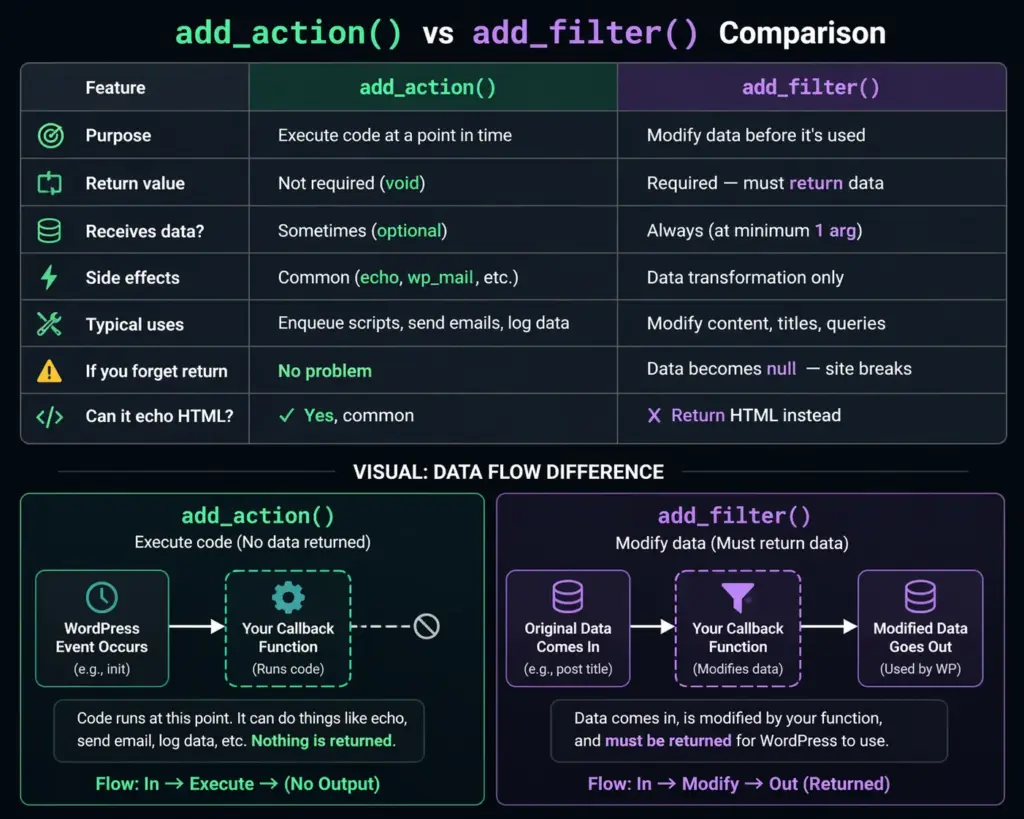
Now that you’ve seen both, let’s put them side by side. Understanding when to use which one is the most important skill here.
| Feature | add_action() | add_filter() |
|---|---|---|
| Purpose | Execute code at a point in time | Modify data before it’s used |
| Return value | Not required (void) | Required — must return data |
| Receives data? | Sometimes (optional) | Always (at minimum 1 arg) |
| Side effects | Common (echo, wp_mail, etc.) | Data transformation only |
| Typical uses | Enqueue scripts, send emails, log data | Modify content, titles, queries |
| If you forget return | No problem | Data becomes null — site breaks |
| Can it echo HTML? | Yes, common | Return HTML instead |
The Simple Mental Model
Here’s a quick way to decide which to use:
- Ask yourself: “Am I doing something (running code, sending email, adding HTML)?” → Use add_action()
- Ask yourself: “Am I changing something that already exists (content, settings, data)?” → Use add_filter()
Understanding Priority in WordPress Hooks
Both add_action() and add_filter() accept a $priority parameter. This controls the order in which multiple functions attached to the same hook run.
The default priority is 10. Functions with a lower number run first.
- Priority 1–4: runs before almost everything
- Priority 10: standard, runs in normal order
- Priority 20+: runs after most other hooks
- Priority 999: runs after virtually everything
// This runs FIRST (priority 5)
add_action( 'wp_footer', 'my_early_footer', 5 );
function my_early_footer() {
    echo 'I run first';
}

// This runs SECOND (priority 10, the default)
add_action( 'wp_footer', 'my_normal_footer' );
function my_normal_footer() {
    echo 'I run second';
}

// This runs LAST (priority 20)
add_action( 'wp_footer', 'my_late_footer', 20 );
function my_late_footer() {
    echo 'I run last';
}
Passing Arguments to Your Hook Functions
Sometimes, WordPress passes multiple pieces of data along with a hook. The 4th parameter in both add_action() and add_filter() — $accepted_args — tells WordPress how many of those arguments your function wants to receive.
// save_post passes 3 args: $post_id, $post, $update
// We tell WordPress we want all 3 with the last parameter
add_action( 'save_post', 'handle_post_save', 10, 3 );

function handle_post_save( $post_id, $post, $update ) {
    if ( $update ) {
        // This is an existing post being updated
        error_log( 'Post updated: ' . $post_id );
    } else {
        // This is a brand new post
        error_log( 'New post created: ' . $post_id );
    }
}
// comment_text filter passes comment content + the comment object
add_filter( 'comment_text', 'modify_comment_text', 10, 2 );

function modify_comment_text( $text, $comment ) {
    // Check if this comment is by an admin
    if ( user_can( $comment->user_id, 'manage_options' ) ) {
        $text = '<span class="admin-badge">Admin</span> ' . $text;
    }
    return $text;
}
Creating Your Own Custom Hooks
Here’s something a lot of beginners don’t realize: you’re not limited to WordPress’s built-in hooks. You can create your own hooks inside your plugin or theme, making your code extensible for others (or yourself).
Creating a Custom Action Hook
Use do_action() to fire a custom action hook:
// In your plugin, fire a custom action
function my_plugin_process_order( $order_id ) {
    // ... do your order processing ...

    // Fire custom hook — lets others extend this
    do_action( 'my_plugin_after_order_processed', $order_id );
}

// Now anyone (other plugins, themes) can hook in:
add_action( 'my_plugin_after_order_processed', 'send_order_confirmation' );

function send_order_confirmation( $order_id ) {
    // Send an email, log to database, etc.
}
Creating a Custom Filter Hook
Use apply_filters() to create a filterable value:
function my_plugin_get_button_text() {
    // Default text, but filterable by others
    $text = 'Buy Now';

    return apply_filters( 'my_plugin_button_text', $text );
}

// Someone else (or your theme) can change this:
add_filter( 'my_plugin_button_text', 'change_button_to_spanish' );

function change_button_to_spanish( $text ) {
    return 'Comprar Ahora';
}
Removing Hooks with remove_action() and remove_filter()
Just as you can add hooks, you can remove them. This is useful when you want to disable something a plugin or theme has added.
// Remove an action hook
remove_action( 'wp_head', 'wp_generator' ); // Hides WP version number

// Remove a filter hook
remove_filter( 'the_content', 'wpautop' ); // Removes auto <p> tags

// IMPORTANT: Use the same priority that was used when adding!
// If a hook was added at priority 20, remove it at priority 20
remove_action( 'some_hook', 'some_function', 20 );
Important Note on Removing Hooks
To successfully remove a hook, you must use the exact same priority that was used when adding it. If you’re not sure what priority a plugin used, check its source code. The default is 10.
Most Commonly Used WordPress Hooks
WordPress has hundreds of hooks. Here are the ones you’ll use most often as a developer:
Essential Action Hooks
| Hook Name | When It Fires | Common Use |
|---|---|---|
| init | After WordPress loads | Register post types, taxonomies |
| wp_enqueue_scripts | Before scripts/styles load | Add custom CSS/JS files |
| wp_head | Inside <head> tag | Add meta tags, inline scripts |
| wp_footer | Before </body> | Add tracking scripts, HTML |
| save_post | When post is saved | Custom meta saving, notifications |
| admin_menu | Admin menu builds | Add custom admin pages |
| user_register | New user registration | Welcome emails, default roles |
Essential Filter Hooks
| Hook Name | When It Fires | Common Use |
|---|---|---|
| the_content | Post/page content | Add banners, ads, custom HTML |
| the_title | Post/page title | Prefix titles, add icons |
| excerpt_length | Excerpt word count | Change excerpt length |
| body_class | Body element classes | Add conditional CSS classes |
| login_errors | Login error messages | Vague error messages (security) |
| wp_nav_menu_items | Navigation menu HTML | Add items, login/logout links |
| upload_mimes | Allowed upload types | Allow SVG or custom file types |
Best Practices for Using Hooks in WordPress
Using hooks correctly is as important as knowing what they do. Here are essential best practices every developer should follow:
1. Always Prefix Function and Hook Names
Use a unique prefix based on your theme or plugin to avoid naming conflicts:
// Bad — too generic, might conflict
add_action( 'init', 'setup_things' );

// Good — unique prefix prevents conflicts
add_action( 'init', 'myplugin_setup_things' );
2. Use Conditional Logic in Hooks
add_action( 'wp_enqueue_scripts', 'load_scripts_only_on_contact' );

function load_scripts_only_on_contact() {
    // Only load heavy scripts on the contact page
    if ( is_page( 'contact' ) ) {
        wp_enqueue_script( 'my-contact-script', plugin_dir_url( __FILE__ ) . 'js/contact.js' );
    }
}
3. Check Nonces for Security on Form Submissions
add_action( 'save_post', 'securely_save_meta' );

function securely_save_meta( $post_id ) {
    // Verify nonce before saving
    if ( ! isset( $_POST['my_nonce'] ) || ! wp_verify_nonce( $_POST['my_nonce'], 'save_my_meta' ) ) {
        return;
    }
    // Safe to proceed...
}
4. Don’t Echo Inside Filters
Filters should return data, not echo it. Echoing inside a filter function causes the output to appear in the wrong place (usually at the very top of the page before any HTML).
5. Keep Hook Functions Focused
Each function hooked should do one specific thing. Don’t jam 10 different tasks into a single hooked function — it makes debugging difficult and reduces reusability.